


Objectives:
- Ban and Unban Users
Steps:
Accessing the Manage Users Settings
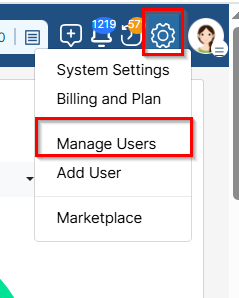
Click on the Settings icon from the main menu, and select Manage Users.
Banning a User
Banning a user permanently prevents them from accessing the system. You must also specify a reason for the restriction.
Steps to Ban a User:
In the Manage Users settings page, locate the user.
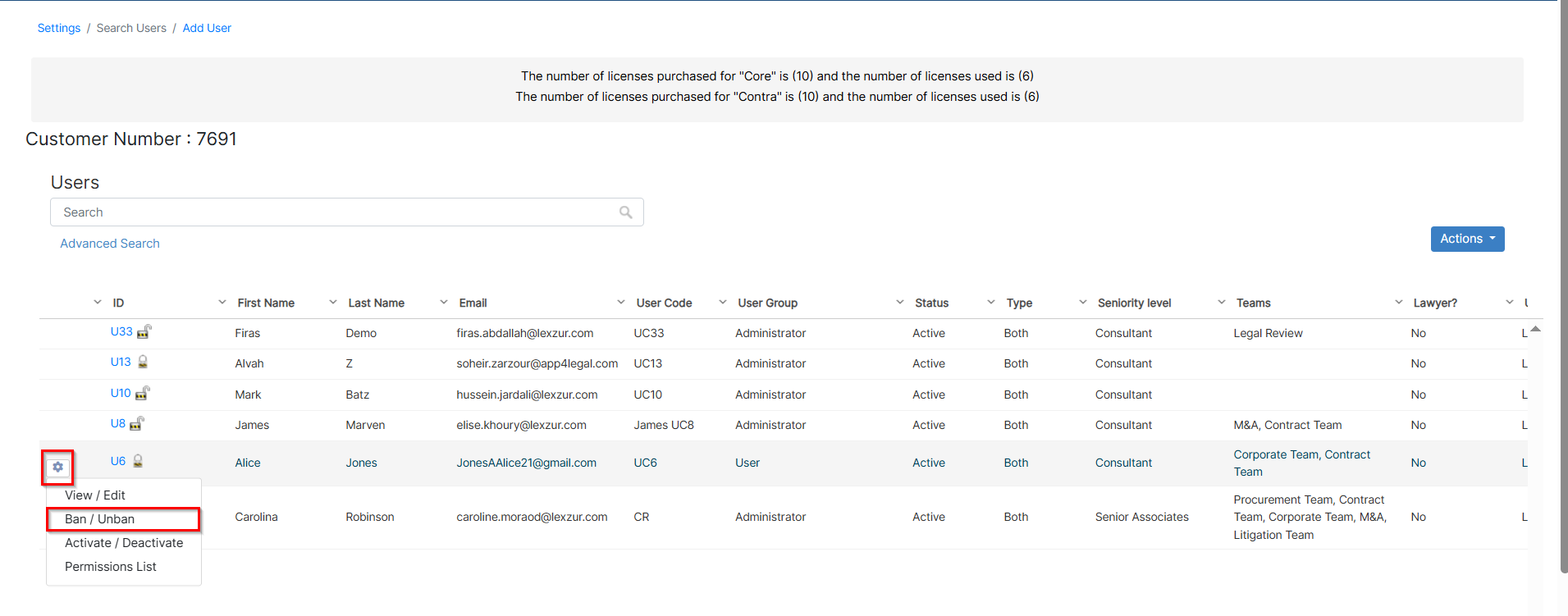
Click on the Action Wheel next to the user ID and select Ban/Unban.

Choose "Yes" to ban the user and enter the reason for banning (optional).
Click Save to confirm.

The user will be notified upon attempting to log in that their account has been banned.

Unbanning a User:
Locate the user in the Active Users list.
Click on the Action Wheel next to their ID and select Ban/Unban.
Set the ban option to "No".
Click Save to reactivate their access.

For more information about LEXZUR, kindly reach out to us at help@lexzur.com.
Thank you!

This page has no comments.